HBO Go has been replaced by HBO Max. If you subscribe to HBO, you will have access to the HBO Max app on your TIVO set top. The app is simply labeled HBO but now includes the new HBO Max streaming service.
Our Internet Help Desk is open 24 hours a day and 7 days a week and can be reached at:
518.296.HELP (4357) or 877.435.7966 (Toll-Free) or via chat: Support
MIDTEL now provides two methods to self-reset/recover your email password. These options include a text message and a secondary email account. You can choose to set up any of the available options you’d like, or both of them. It is important that this is set up BEFORE you find yourself needing to reset/recover your email password.
Steps to self recover a password can only be used once you have set up the following Password Recovery service. If you have forgotten your password and have not activated these settings, please call us at 518.827.5211 and we will manually reset your password for you.
To view a step-by-step guide on how to set up password recovery for your account, click the link below.
For MIDTEL subscribers who have TV sets that do not have a Set-Top Box or DVR, it is important that you understand how to rescan your TV to have the most recent channel information. Please view the attached Quick Guide to assist you in rescanning your TV.
DTA stands for Digital Transport Adapter and is also known as a Set Top Box. It is a digital cable device that allows you to use your analog “Tube TV” to watch all the Basic and Expanded Basic channels that were migrated from analog to digital (Usually the first 125 channels). DTAs will not receive premium channels such as HBO, Showtime, etc. Please consult our channel lineup card for details.
A sun outage, or sun spots, is an interruption in satellite signals caused by interference from solar radiation. The interference is caused when the sun is in direct line with a communication satellite and the sun’s radiation overwhelms the satellite signal. Each channel may be affected for 1 to 7 minutes as the sun moves across the horizon. This is a naturally occurring phenomenon that we have no control over and it affects all satellite delivered channels to all video carriers.
When do Sun Outages Occur and how long do they last?
Sun Outages occur every Spring and Fall and typically can last for about a week. The sun spots occur during the daylight hours and are a brief disruption typically lasting less than ten minutes.
How will it impact your service?
During Sun outages, you may experience short interruptions in your service such as sparkles, pixelated or fuzzy picture, picture freezing, audio distortions, or even a total loss of the channel.
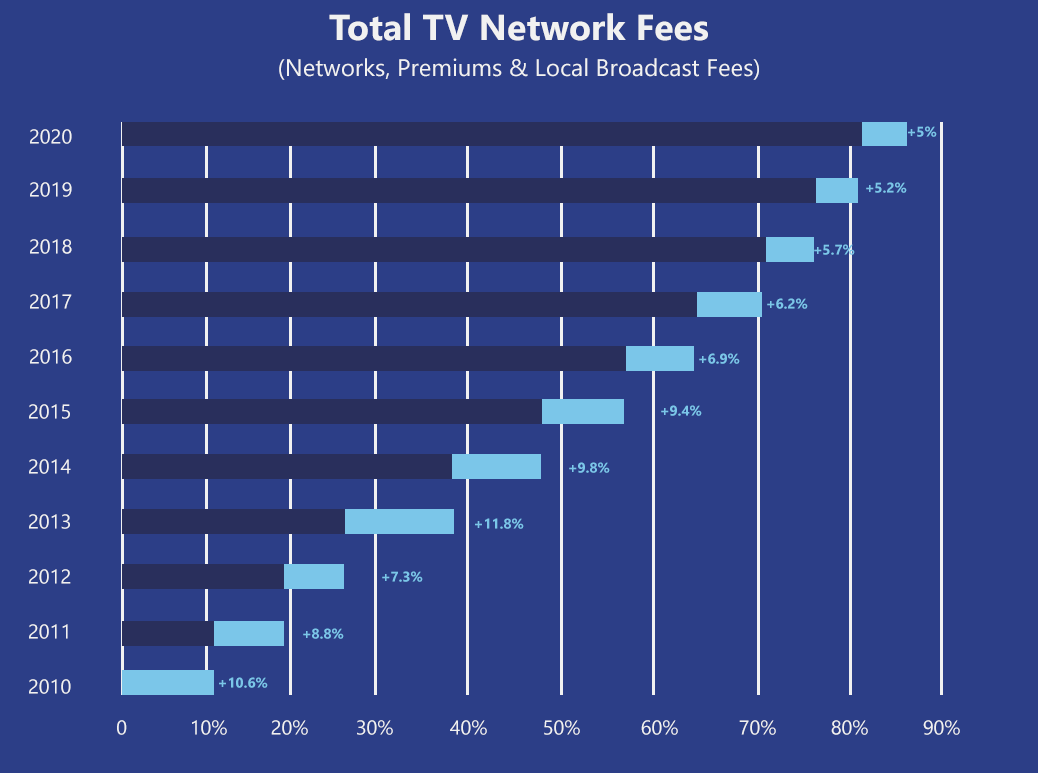
Local TV stations are demanding increasingly higher fees to be included on TV Provider’s line-ups, even though they are still available free over-the-air. National broadcast networks are adding to the burden by demanding a cut of local stations’ fees. If their demands are not met, they pull their signals from their viewers and ask you to complain to your TV Provider, leaving you without your favorite programming until an agreement is reached. And if those fee demands are met, it results in higher prices for you.
Are you ready to take your favorite shows with you wherever you go?
Access live TV on the fly NOW with WatchTVEverywhere!
WatchTVEverywhere is a free service that allows you to watch your favorite channels on your tablet,
smartphone and laptops from anywhere you have internet service whether you are at your home, at the office, on vacation, everywhere you go.
How to Use: To use WatchTVEverywhere you will need to complete an easy registration; a copy of a recent MIDTEL invoice will speed this process.
Which shows are available? You can watch any WatchTVEverywhere program, as long as you are a subscriber to that network. For example, if you are subscribed to A&E with MIDTEL cable television service you are able to watch A&E’s WatchTVEverywhere programs.
Our Internet Help Desk is open 24 hours a day and 7 days a week and can be reached at:
518.296.HELP (4357) or 877.435.7966 (Toll-Free) or via chat: Support
Virtual mail allows you to create and manage your own email addresses using your own personal domain name (email@yourdomainname.com). Email administration is done through a webpage interface at https://cpanel.yourdomainname.com
A username and password will be provided at sign up. If you need this password reset, please contact MIDTEL customer service.
Our Internet Help Desk is open 24 hours a day and 7 days a week and can be reached at: 518.296.HELP (4357), otherwise you can contact us at 518.827.5211 or by email.
Our Internet Help Desk is open 24 hours a day and 7 days a week and can be reached at:
518.296.HELP (4357) or 877.435.7966 (Toll-Free) or via chat: Support
All three of these servers need to be listed in your Domain Name Registration record. This is done automatically if you register the domain name through us. If the domain name is not registered through us, you’ll need to have these records included in your servers.
ns0.inoc.net
ns1.inoc.net
ns2.inoc.net
Our Internet Help Desk is open 24 hours a day and 7 days a week and can be reached at:
518.296.HELP (4357) or 877.435.7966 (Toll-Free) or via chat: Support
For technical support of your internet, WiFi, Cable TV or phone services our Help Desk is open 24 hours a day and 7 days a week. You can call Toll Free at 877.435.7966, direct at 518.296.HELP (4357) or click below to chat live with a technician.
If you pause a TV show, then come back one hour later and press play, your set-top will continue playing the station at one hour behind. To get back to current time press the “LIVE” button on your remote. Powering the set-top off and on will work, too.
Our Internet Help Desk is open 24 hours a day and 7 days a week and can be reached at:
518.296.HELP (4357) or 877.435.7966 (Toll-Free) or via chat: Support
To order a change of service, please fill out the form below. Or, our Internet Help Desk is open 24 hours a day and 7 days a week and can be reached at:
518.296.HELP (4357) or 877.435.7966 (Toll-Free) or via chat: Support
To submit a question about your bill, please fill out the form below. Or, our Internet Help Desk is open 24 hours a day and 7 days a week and can be reached at:
518.296.HELP (4357) or 877.435.7966 (Toll-Free) or via chat: Support
Q. I have an Apple iPhone. I can receive my MIDTEL e-mails, but I can not send.
A. Try clicking on your MIDTEL email account, then scroll down to Outgoing Mail Server (SMTP). As for the Host Name, use – “mail.midtel.net:587” (without the quotation marks). The entry of your username would be your full e-mail address – username@midtel.net. Finally, scroll down and choose Advanced and denote/choose Password Authentication.
Q. What is the maximum size e-mail attachment I can send using MIDTEL’s e-mail service?
A. The total size of the message, including the body and any attachments is 20MB.
Q. I’m trying to set up an e-mail server, but the outgoing messages seem to be blocked, why?
A. MIDTEL blocks outgoing traffic on Port 25, this is mainly to stop viruses that setup their own SMTP on the infected device. You can gain the ability to send on Port 25 by subscribing to a Static IP address. Please contact MIDTEL to set one up.
Q. I use MIDTEL for my e-mail, but sometimes I connect to the Internet through another ISP. When I do this I can receive my e-mail, but I can not send, why?
A. You’ll need to configure additional settings in your e-mail client to do this. First, set your e-mail client to use SMTP Authentication. Second, set your e-mail client to send mail on Port 587.
Our Internet Help Desk is open 24 hours a day and 7 days a week and can be reached at:
518.296.HELP (4357) or 877.435.7966 (Toll-Free) or via chat: Support
For quick access, from any internet connected computer with a web browser, you can use MIDTEL’s Webmail https://mail.midtel.net
If you would like to set up your @midtel.net account on your phone or computer using applications such as Gmail, Outlook, or Thunderbird, you must enter the server settings for MIDTEL during their setup process. The correct Email Server Settings for POP3, IMAP and SMTP are as follows.
Incoming Server Settings
Based on their descriptions, choose to use either POP3 or IMAP as your incoming server. You do not need to enter the information for both.
POP3 Server Settings
POP3 is the Post Office Protocol for retrieving e-mail messages. Your client downloads your e-mails from the MIDTEL server to your Inbox, then deletes the server copy. Your e-mail messages are stored locally on your device.
POP Server (Incoming) – pop.midtel.net
SSL Encrypted Port Number – 995
IMAP Server Settings (Recommended)
When using IMAP your e-mail messages stay stored on MIDTEL’s servers. This includes your Inbox, Sent Items and other Saved Folders. This is ideal if you would like to access your e-mails on multiple devices.
IMAP Server (Incoming) – mail.midtel.net
SSL Encrypted Port Number – 993
Outgoing Server Settings
SMTP Server Settings
SMTP Server (Outgoing) – mail.midtel.net
SSL Encrypted Port Number – 587
SMTP Authentication is Mandatory
Our Internet Help Desk is open 24 hours a day and 7 days a week and can be reached at:
518.296.HELP (4357) or 877.435.7966 (Toll-Free) or via chat: Support
Yes. While MIDTEL provides a WiFi router with your internet service, you do have the option of deploying your own. You will need a PPPOE compatible router to connect to the MIDTEL service. Please contact the MIDTEL office to obtain a PPPOE user name and password during normal business hours. (M-F 8AM-12PM and 1PM-5PM EST)
For other issues our Internet Help Desk is open 24 hours a day and 7 days a week and can be reached at:
518.296.HELP (4357) or 877.435.7966 (Toll-Free) or via chat: Support
Fiber technology carries communication services uses light waves instead of electricity. Direct Fiber SPEED, powered by MIDTEL, known as Fiber-to-the-Home (FTTH) or Fiber-to-the-Premise (FTTP) for Business, is the most advanced communication system available in the world today. Direct Fiber SPEED is incredibly efficient, allowing data to flow farther and faster than ever before.
Shocking Speed – Consistent,lightning fast and unlimited data.
Reliability – Withstands the elements. No shared bandwidth.
More of Everything – Connect more. Stream more. Save more.
The Future – Grows with you. Advanced innovative design.
Security – Protected connections. Harder for hackers.
Home Values – Invest in fiber. Increase home value.
Not sure if you can get fiber? Check out the interactive map below:
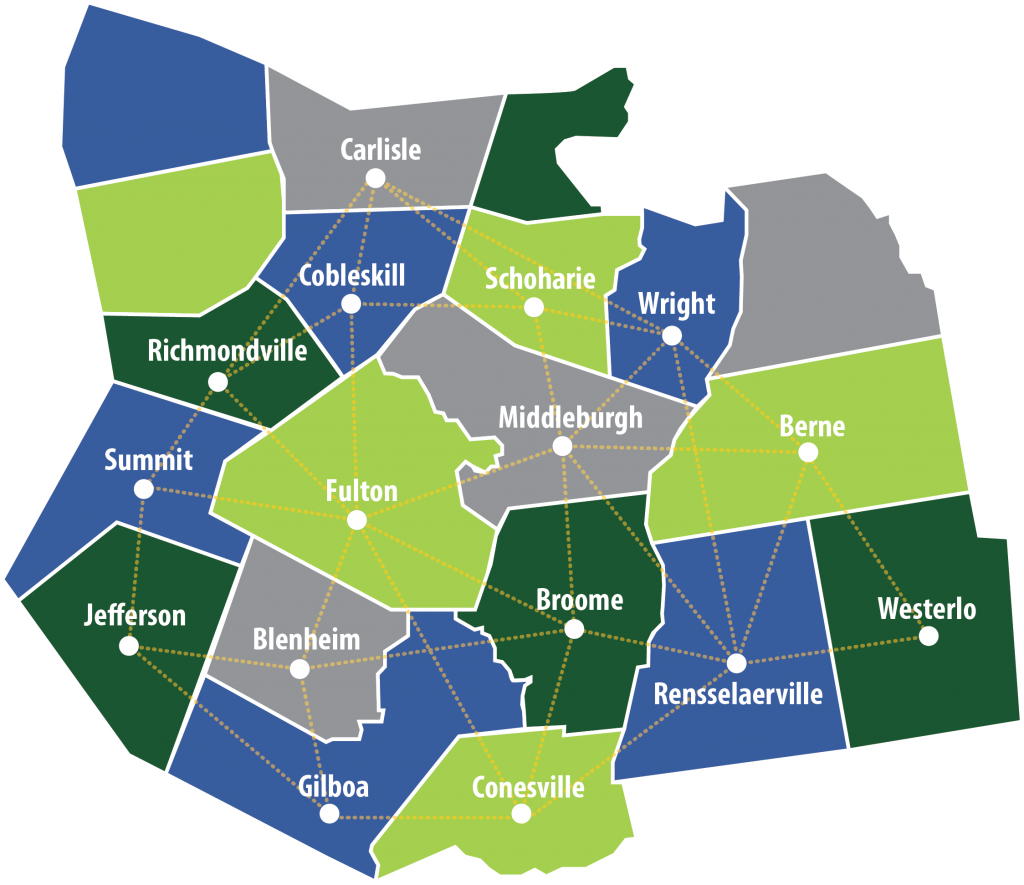
MIDTEL will install fiber optic cable directly to over 3,600 homes and businesses in portions of the towns of Berne, Broome, Blenheim, Carlisle, Cobleskill, Conesville, Fulton, Gilboa, Jefferson, Middleburgh, Rensselaerville, Richmondville, Schoharie, Summit and Wright. Construction will commence during the summer of 2018 for Phase 1 & Phase 2 in terms of mainline routes and be ready for customer drops in a phased approach starting in 2018. The Phase 3 (Berne & Rensselaerville) mainline route construction will commence 2020.
Not sure if you can get Fiber? Check out the interactive map below:
If you wish to sign up with MIDTEL as your long distance carrier, there are a couple of forms to sign. Please call 518.827.5211 for us to walk through this process with you.
Our Internet Help Desk is open 24 hours a day and 7 days a week and can be reached at:
518.296.HELP (4357) or 877.435.7966 (Toll-Free) or via chat: Support
Whether checking your voicemail from home or away, MIDTEL voicemail is simple, convenient, and reliable. Please view the attached guide to assist you in using your MIDTEL voicemail.
Have you recently had someone outside our local calling area try to call you but got no answer, or the phone keeps ringing or other problems? Does your phone sometimes ring, but no one is on it when you answer?
These and other similar problems have become a national issue to the point that the Federal Communications Commission (FCC) has been investigating the problem. What is causing this relatively recent phenomenon given the fact that telephones have been around for 100 years?
Over the last few years complaints concerning calls to rural areas across the country have been on the rise. Many point to wholesale network providers known as “Least Cost Routers” who route long distance calls on behalf of telephone providers. With competition and the growing number of unlimited calling plans being offered, certain telephone providers increasingly turn to “Least Cost Routers” to keep costs down. Given the higher than average cost to complete long distance calls to rural areas than more populated urban areas, some providers unfortunately may be deciding that it is cheaper to not complete calls.
Earlier this year, the FCC issued a ruling warning carriers of suspensions and/or possible fines of up to $1.5 million for failing to complete calls. For additional information or to report a problem, visit the FCC’s website.
Our Internet Help Desk is open 24 hours a day and 7 days a week and can be reached at:
518.296.HELP (4357) or 877.435.7966 (Toll-Free) or via chat: Support
Fiber Locator
Enter and select your address.
If we aren’t able to find your address or if you have any questions, please complete the Contact Us form or call 877.827.5211.